If you’re eager to try WFilter NG Firewall, spinning it up in VMware seems like a quick win. But before you rely on virtual testing, there are two pitfalls that can waste your time: the hidden bandwidth cap and the gateway/DHCP setup. Let’s dive into these real-world scenarios.
1. The Bandwidth Halving Trap in Virtual Machines
Imagine you have a 100Mb network connection. You install WFilter NG Firewall in VMware, run a speed test, and see only 50Mb throughput. You might think the firewall is slow—but it’s not. The VM environment itself is the bottleneck.
In a virtual machine, both outgoing and incoming traffic share the same virtual cable. So if your physical network link is 100Mb, the maximum bandwidth you can get through the VM is 50Mb. This is a critical limitation for preview testing: you cannot judge the real performance of WFilter NG Firewall based on VM results.
Use VMs only to explore features, not to benchmark throughput. For accurate performance testing, install WFilter NG Firewall on a physical PC.

2. Gateway Mode and DHCP: Avoiding Network Conflicts
WFilter NG Firewall must run in ‘gateway’ mode inside a VM. That means it sits between your clients and the internet, inspecting traffic. But here’s the catch: your existing network probably has its own gateway and DHCP server.
Suppose your subnet is 192.168.1.x with gateway 192.168.1.1. In the WFilter NG Firewall setup wizard, you choose ‘Gateway’ and assign a static IP to the WAN interface (e.g., 192.168.1.2). Then you need to point client devices to the firewall’s LAN IP (192.168.10.1) as their gateway. If a client still uses the old gateway, WFilter cannot control it.
The bigger pain point: an existing DHCP server. If your network already has one, it will keep handing out the old gateway to clients. You must disable it so WFilter NG Firewall becomes the DHCP server. Then all clients with dynamic IPs will be redirected automatically.
This step is easy to overlook during a quick VM test, leading to confusion: ‘Why isn’t the firewall blocking anything?’ The answer is usually a DHCP conflict or a misconfigured gateway.
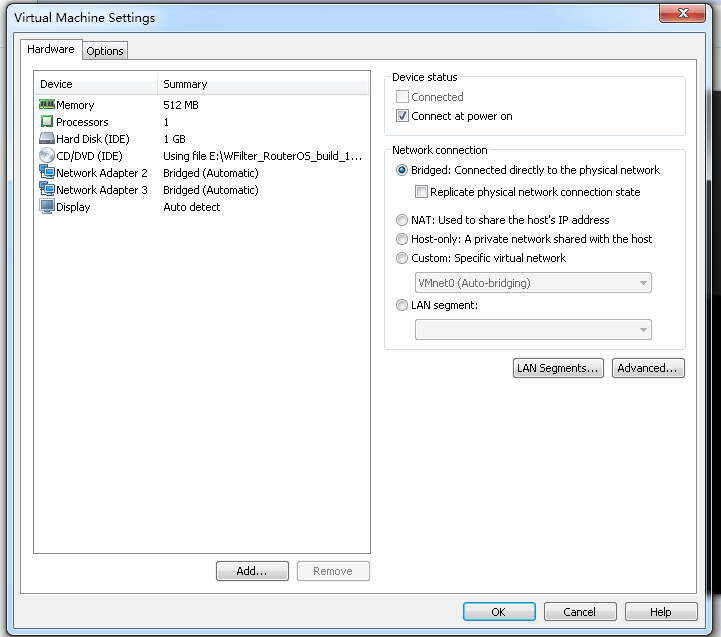
By keeping these two points in mind—bandwidth limits and gateway/DHCP setup—you can avoid false conclusions and get the most out of your VMware preview of WFilter NG Firewall.